
Smart Simulation Workflow for Faster, Cost-Effective Product Development
Automating CAE workflows frees engineers from repetitive tasks like pre-processing, meshing, and post-processing, allowing them to focus on R&D and design optimization. This streamlines simulation setup, ensures consistency, reduces errors, and accelerates product development—enhancing productivity and cutting costs.
2/19/20252 min read
The Tedious and Time-Consuming Simulation Process
In medium and large organizations, Computer-Aided Engineering (CAE) simulations are crucial for product development. However, the conventional simulation process is cumbersome, involving multiple departments and several manual steps, including:
CAD modeling and parameterization
Exporting CAD parts to simulation tools
Importing CAD files into pre-processing tools like HyperMesh and ANSA
Generating mesh and assigning boundary conditions
Running simulations and analyzing results
Generating reports with relevant images and findings
Each of these steps requires human intervention, leading to inefficiencies, extended development times, and increased costs.
Bottlenecks Slowing Down Innovation
When different teams handle various simulation stages, inefficiencies arise:
Time Delays: Manual processes slow down project timelines.
Inconsistencies: Variations in meshing, boundary conditions, and solver settings impact result reliability.
High Costs: Repetitive tasks increase labor costs and resource consumption.
Reduced Productivity: Engineers spend more time on routine tasks rather than innovation.
In an era where speed and efficiency define competitive advantage, these bottlenecks hinder organizations from achieving optimal product development.
Smart Simulation Workflow – A Fully Automated CAE Process
To address these challenges, I developed the Smart Simulation Workflow, an end-to-end automated process that streamlines CAE simulations with a push-button execution approach.
How It Works:
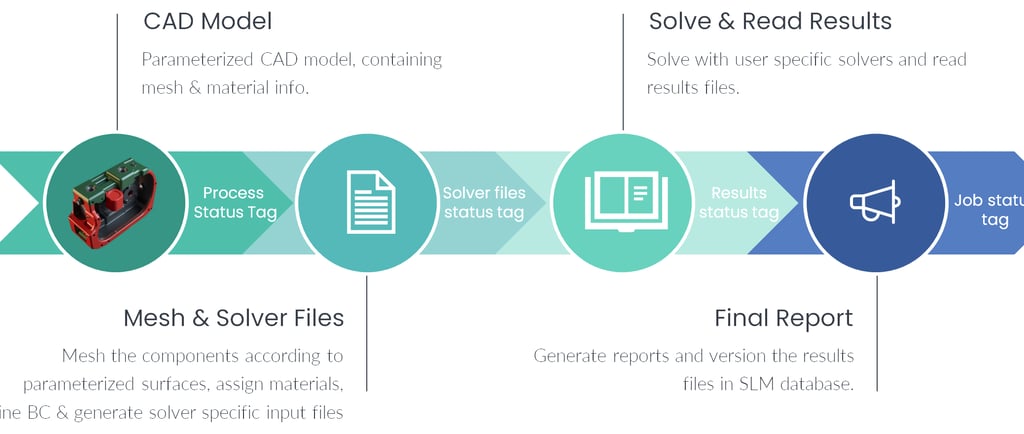
1. CAD Model Parameterization: The CAD model is fully parameterized and pre-defined with material assignments and boundary condition details.
2. Seamless Integration: The workflow exports the CAD model and imports it directly into pre-processing tools like HyperMesh, ANSA or any other tool.
3. Automated Mesh Generation: The workflow automatically generates the mesh according to the information provided in the parameterized CAD model and prepares solver input files.
4. Batch Mode Execution: The simulation is run using a designated solver without manual intervention.
5. Auto-Report Generation: The workflow extracts results, processes critical insights, and generates a structured report with images.
Faster, Smarter, and More Cost-Effective Development
Reduced Development Time: Automating simulations eliminates repetitive manual tasks, cutting down the overall process time.
Improved Productivity: Engineers focus on innovation while the workflow handles simulations end-to-end.
Lower Costs: Fewer manual interventions mean reduced labor costs and minimal errors, optimizing resource utilization.
Standardized and Reliable Results: Consistency across global teams ensures better decision-making and streamlined operations.
By implementing the Smart Simulation Workflows, organizations can improve their product development process, achieving higher efficiency, lower costs, and shorter time-to-market.
Let’s discuss how automation can drive your engineering success!